
A normal new tab
- A blank page, or a grid of sites you never picked
- 30 tabs open, because closing one means losing it
- Bookmarks buried in folders you never open
- “Where did I save that link?”, five times a day
Save any tab, link or note in one click,
then find it instantly, right on your new tab.



1,000+ people already installed the extension
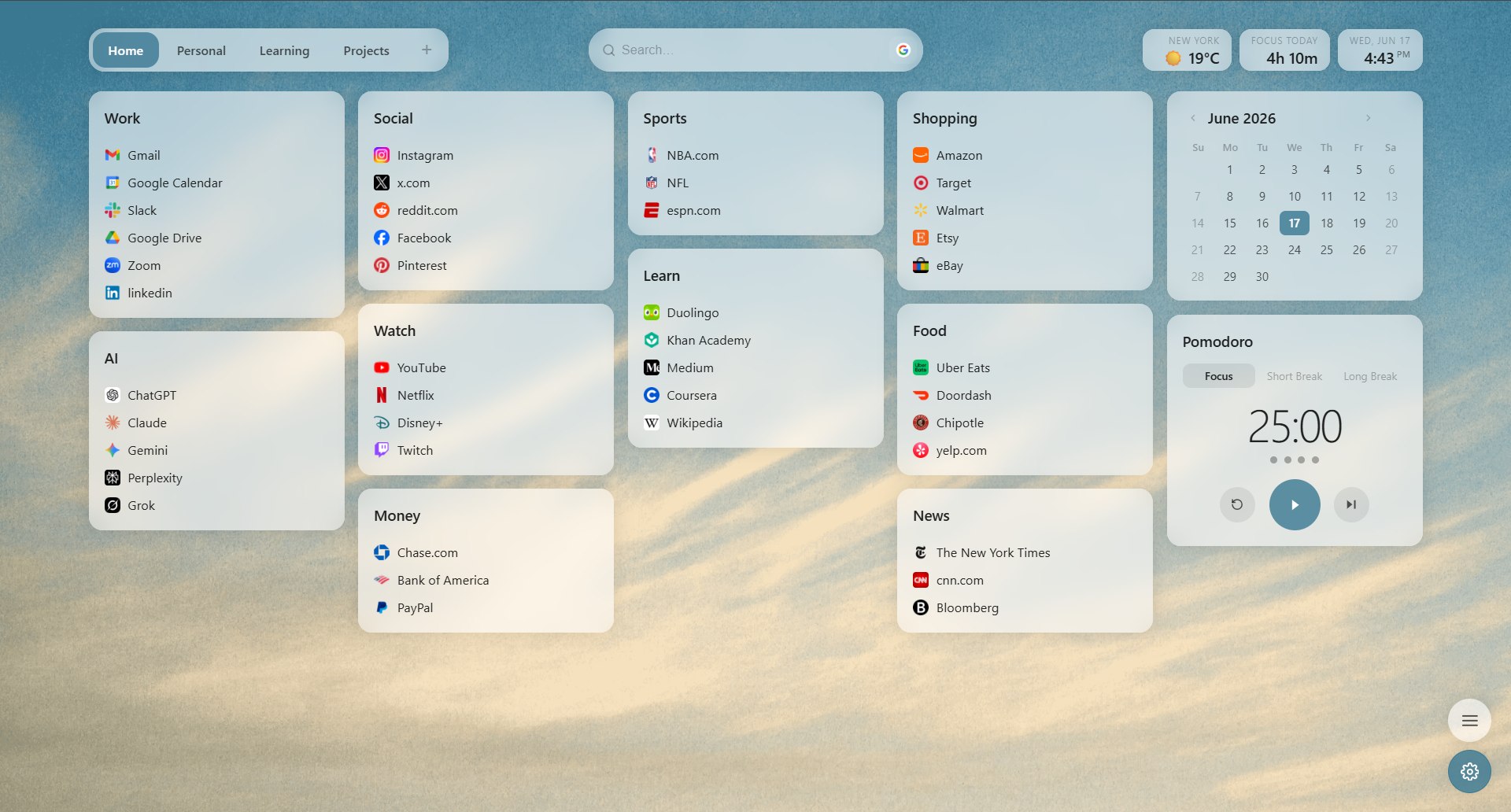
Drag and drop your bookmarks into clean, visual boards.
Save any page onto a board with a shortcut. The fastest way to bookmark.
Sign in and your boards follow you to every computer, always up to date.
Import your existing Chrome bookmarks in seconds to get started right away.
Set beautiful wallpapers and make your new tab feel like a place of your own.
Add minimal widgets like a clock and quick search to keep what matters in view.
Takes less than a minute
Arrives by email
Activate the extension and you’re set
“Looks clean, runs smoothly, and doesn’t make Chrome feel heavier. That’s honestly all I wanted. The wallpapers are a nice bonus too.”
“I’ve been using Markmez for about two weeks. I had more than 300 bookmarks in Chrome that were basically a mess. Moving them into different boards was a bit of work, but now everything is organized and I can actually find what I’m looking for.”
“I have separate pages for work, personal stuff, and AI tools. It’s a simple idea, but it keeps everything much more organized.”
Launch offer · 50% off
Every plan includes
One-time payment · not a subscription
7-day money-back guarantee
One-time payment · yours forever
7-day money-back guarantee
After a week of using it, going back to Chrome’s default bookmarks wasn’t an option anymore.
Email us at markmezapp@gmail.com within 7 days of buying and we’ll refund you. No questions, no forms.
Bookmarks are a filing cabinet you never open. Markmez puts what you saved on the page you already see dozens of times a day, so you actually come back to it.
No. Both plans are one-time payments. The yearly plan gives you 12 months of full access for $9 and never renews on its own. Lifetime is a single $25 for permanent access, including all future updates.
Right after payment you receive your install link and your activation key by email. Install Markmez from that link, open a new tab, paste the key, and you’re unlocked. It takes a couple of minutes.
Yes. Sign in and your boards sync to every computer, always up to date. One licence covers all your devices.
Nothing is deleted. Markmez sits on top of your new tab, and you can import your existing browser bookmarks onto boards whenever you like.
Yes. There are no ads, no tracking and we never sell your data. Your bookmarks stay yours, and you can export them at any time.
Markmez works on desktop in Chrome, Microsoft Edge, Opera, Brave and other Chromium-based browsers.
Sometimes the email lands in your Spam folder, so please check there first. If it’s not there, just email us at markmezapp@gmail.com from (or mentioning) the address you used at checkout, and we’ll get you sorted.
Buy once and get instant access.
Keep it for a year at $9, or forever for a one-time $25.
7-day money-back guarantee